Tuesday, July 06, 2010

SQLXML Gymnastics

Producing well-formed XML from SQL:
SELECT
ID,
Name as 'Names/FirstName',
Surname as 'Names/LastName'
FROM
Names
FOR XML PATH('person'), ROOT('people')
Converting XML into a table:

Input:
<Elements>
<Element>
<Index>1</Index>
<Type>3M</Type>
<Code>AL</Code>
<Time>1900-01-01T10:22:00</Time>
</Element>
<Element>
<Index>2</Index>
<Type>3M</Type>
<Code>AA</Code>
<Time>1900-01-01T19:00:00</Time>
</Element>
</Elements>
SQL:
SELECT
r.value('Index[1]', 'int') [Index],
r.value('Type[1]', 'nvarchar(50)') [Type],
r.value('Code[1]', 'nvarchar(50)') [Code],
r.value('Time[1]', 'datetime') [Time]
FROM
@content.nodes('/Elements/*') AS records(r)
Converting XML into a pivot table:

Input:
<Elements>
<Element>
<Index>1</Index>
<Type>3M</Type>
<Code>AL</Code>
<Time>1900-01-01T10:22:00</Time>
</Element>
<Element>
<Index>2</Index>
<Type>3M</Type>
<Code>AA</Code>
<Time>1900-01-01T19:00:00</Time>
</Element>
</Elements>
SQL:
SELECT
El.Elem.value('(Index)[1]', 'int') [Index],
SubEl.SubElem.value('local-name(.)', 'varchar(100)') AS 'Field Name',
SubEl.SubElem.value('.', 'varchar(100)') AS 'Field Value'
FROM
@content.nodes('/Elements/Element') AS El(elem)
CROSS APPLY
El.Elem.nodes('*') AS SubEl(SubElem)
WHERE
SubEl.SubElem.value('local-name(.)', 'varchar(100)') <> 'Index'
Produces:

IndexField NameField Value
1Type3M
1CodeAL
1Time1900-01-01T10:22:00
2Type3M
2CodeAA
2Time1900-01-01T19:00:00

Extracting attribute names (plus parent element name of each attribute):
SELECT
elem.value('local-name(..)', 'nvarchar(10)') AS 'Parent Name',
elem.value('local-name(.)', 'nvarchar(10)') AS 'Attribute Name',
elem.value('.', 'nvarchar(10)') AS 'Attribute Value'
FROM
@content.nodes('//@*') AS El(elem)
Extracting field names:
SELECT DISTINCT r.value('fn:local-name(.)', 'nvarchar(50)') FieldName
FROM @xml.nodes('/*/*') AS records(r)
Extracting nodes as XML:
SELECT
pref.query('.') as SomeXml,
FROM
@xml.nodes('/*/*') AS Content(pref)
Extracting nodes as XML with indices only if they have child nodes:
SELECT
row_number() over(order by cast(pref.query('.') as nvarchar(max))) as 'RowNum',
pref.query('.') as XmlExtract
FROM
@xml.nodes('/*/*') AS extract(pref)
WHERE
pref.value('./*[1]', 'nvarchar(10)') IS NOT NULL

Given:
DECLARE @content XML
SET @content =
'<people>
<person id="1" bimble="1">
<firstname bobble="gomble">John</firstname>
<surname>Doe</surname>
</person>
<person id="2" bimble="11">
<firstname bobble="zoom">Mary</firstname>
<surname>Jane</surname>
</person>
<person id="4" bimble="10">
<firstname bobble="womble">Matt</firstname>
<surname>Spanner</surname>
</person>
</people>'
Return:
-- All attributes with parent element name
SELECT
elem.value('local-name(..)', 'nvarchar(10)') AS 'Parent Name',
elem.value('local-name(.)', 'nvarchar(10)') AS 'Attribute Name',
elem.value('.', 'nvarchar(10)') AS 'Attribute Value'
FROM
@content.nodes('//@*') AS El(elem)

-- Inner element values (with index attribute)
SELECT
El.Elem.value('(@*)[1]', 'int') [Index],
SubEl.SubElem.value('local-name(.)', 'nvarchar(10)') AS 'Field Name',
SubEl.SubElem.value('.', 'nvarchar(10)') AS 'Field Value'
FROM
@content.nodes('/*/*') AS El(elem)
CROSS APPLY
El.Elem.nodes('*') AS SubEl(SubElem)

-- Second level element attributes (with index attribute)
SELECT
El.Elem.value('(@*)[1]', 'int') [Index],
SubEl.SubElem.value('local-name(.)', 'nvarchar(10)') AS 'Field Name',
SubEl.SubElem.value('.', 'nvarchar(10)') AS 'Field Value'
FROM
@content.nodes('/*/*') AS El(elem)
CROSS APPLY
El.Elem.nodes('@*') AS SubEl(SubElem)

-- Third level element attributes (with index attribute)
SELECT
El.Elem.value('(@*)[1]', 'int') [Index],
SubEl.SubElem.value('local-name(.)', 'nvarchar(10)') AS 'Field Name',
SubEl.SubElem.value('.', 'nvarchar(10)') AS 'Field Value'
FROM
@content.nodes('/*/*') AS El(elem)
CROSS APPLY
El.Elem.nodes('*/@*') AS SubEl(SubElem)

-- All element attributes and parent element name (with index attribute)
SELECT DISTINCT
El.Elem.value('(@*)[1]', 'int') [Index],
SubEl.SubElem.value('local-name(..)', 'nvarchar(10)') AS 'Parent Name',
SubEl.SubElem.value('local-name(.)', 'nvarchar(10)') AS 'Field Name',
SubEl.SubElem.value('.', 'nvarchar(10)') AS 'Field Value'
FROM
@content.nodes('/*/*') AS El(elem)
CROSS APPLY
El.Elem.nodes('//@*') AS SubEl(SubElem)
ORDER BY [Index]

External references:

I got the XML to paste properly by using this link to encode the XML into HTML:
  • http://centricle.com/tools/html-entities/

Friday, July 02, 2010

Server Application Unavailable

I'm hoping that this post will one day come under the tag heading "problem solved" but for now it's going to be "problems."

This damn thing seems to crop up whenever you least expect it. There's multiple solutions, none guaranteed.

Essentially, the initial problem with be a message in big red letter which says "Server Application Unavailable"

This is basically a message from IIS saying you don't have permissions to see the proper error.

In my particular case, giving the directory hosting the web app full security permissions to the ASPNET user identity and dropping the IIS Virtual Directory (tab) Application Protection to Low allowed the true error to be seen.

This was: Could not load file or assembly 'System.Web.Extensions, Version=2.0.....' etc.

At the same time, the Event Viewer also started showing: Failed to execute the request because the ASP.NET process identity does not have read permissions to the global assembly cache

I have also tried referencing the correct DLLs in the project references as I had tried to correct these links to the up-to-date DLLs, however they should have been pointing at a very specific location, brought in by SVN.

Ok, so the secret to this particular mess seems to have been "Make sure you're referencing the right DLLs."

Now the only problem is to solve the code issues in the controls!

Resources looked at so far include:

Adding And Subtracting Dates In T-SQL

This code will add 10 days to the current date:
@declare myDate datetime
set @myDate = (select dateadd(dd,10,getdate()))
select @myDate
This code will subtract one month from the passed in date:
@declare myDate datetime
set @myDate = (select dateadd(mm,-1,@dateArg))
select @myDate
Found at:

Thursday, July 01, 2010

Splitting Strings in T-SQL Using XML

Having this post:
And later finding this forum entry:
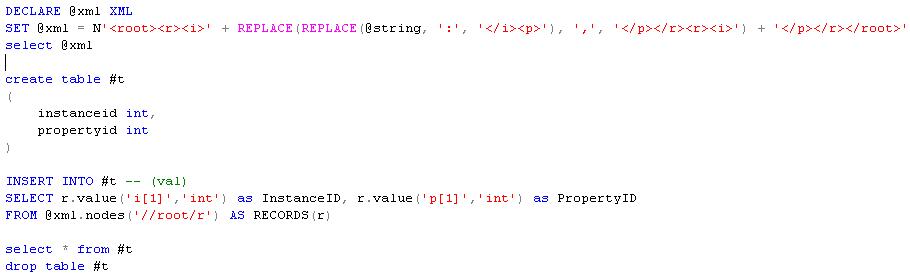
I have come up with my own SQL which does not require a function in order to take a series of pairs of integers and split them into a two-field result set:


Which when run on it's own, will output this:


The effect here is that a string passed in as a parameter can contain pairs (rows) of integers; each column in the rows being separated by ':' and each row being separated by ','.

This is aggregated into a single XML element, which can then be parsed into specific types in a result set (table) format.

Note: Sorry for the images, but blogger.com's online editor would not let me paste the XML source.

Event Firing Delegate Handlers For Basic Use Controls

Sometimes it's nice and tidy and simply easy to create a small user control which can listen fire events when it does something. This requires the use of delegates, the format of which escapes me every single time. Argh!

Anyway, here's an example:
public delegate void ChartSelected(int chartId);
public ChartSelected onChartSelected = null;
So the parent control or page would assign a method to the onChartSelected delegate to be fired when, in this case, a chart is selected:
selector.onChartSelected = MyEventMethod;
And the method fired when called would look like the delegate identifier:
private void ChartSelected(int chartId)
{
// do something
}
Of course, the control declaring the delegate has to fire the event at some point:
if (onChartSelected != null)
onChartSelected(someSelectedValue);

Monday, June 28, 2010

More SQL XML, Making It Easier...

Well, I've previously used stored procedures to execute SQLXML queries, pulling the XML out using a standard SqlDataAdapter and concatenate the returned rows via a StringBuilder.

There is, however, a different mechanism to use:
  • It does throw a large number of exceptions, so your code needs to be clean.
  • You will need to remove System.Data.SqlClient because the new DLL replaces the namespaces found in the original DLL.
Example code:

using Microsoft.Data.SqlXml;

string connectionString = ConfigurationManager.ConnectionStrings["connStr"].ConnectionString;
SqlXmlCommand queryCommand = new SqlXmlCommand(connectionString);
queryCommand.CommandText = @"SQL * FROM something FOR XML";

SqlXmlParameter queryParameter = queryCommand.CreateParameter();
queryParameter.Value = 2860;
queryCommand.RootTag = "root";
queryCommand.XslPath = Server.MapPath("~/XSLT/formatter.xslt");
queryCommand.ClientSideXml = true;
XmlDocument xmlChartData = new XmlDocument();
xmlChartData.Load(queryCommand.ExecuteXmlReader());


Friday, June 25, 2010

Listing Table Column Names On One Line

I wanted to list out all the names of a table on one line, separated by tab characters, so that I could do a simple copy-paste from the SQL Server Management Studio into an Excel sheet - having each column name place itself conveniently into the next Excel column.

The code I came up with is a slight modification of a previous post:
select STUFF(
(SELECT char(9) + name FROM
(SELECT c.name
FROM syscolumns c inner join sysobjects o on c.id = o.id
where o.name = 'your-table-name') AS Y
--ORDER BY names -- optional sorting of the column names
FOR XML PATH('')),
1, 1, N'')


Wednesday, June 23, 2010

Monday, June 21, 2010

Prince Of Persia For iPhone And iPad Is Awesomely 8 Bit

Having run across the re-release of the original Prince Of Persia on the iPhone App Store (under Featured) I found that it can be sync'd across to the iPad and then uses a whole other set of higher resolution graphics - making it perfect for full size retro gaming.

One post I found, after search for the age old "can't pick up sword!!!" problem was this:
However, click the "Controls" option on the main menu shows that the "action" button is in fact anywhere on the screen, that isn't already one of the four Up, Down, Left or Right buttons.

Here's some visual goodness for you to rest your eyes on - and remember, the one PoP app works on both iPhone and iPad, with improved graphics on the iPad!...

Prince Of Persia on iPhone...


Prince Of Persia on iPad...

Sunday, June 20, 2010

L2B 2010 - It's Over!

It was long and it was kinda cold, actually, but it warmed up once we got to Brighton - yeah, afterwards!

Pictures from the day...


Here's the route we eventually took...


View L2B 2010 in a larger map

London To Brighton 2010

This Father’s Day, Sunday 20th June, I am doing (again) the BHF London to Brighton 58 mile bike ride in a Morph Suit! It’s a grueling challenge filled with blood, sweat, tears, burgers, beer, steep hills and numb-bum-syndrome.

It really is a worthy cause – and I will look a complete prat - so please, if you can, follow this link and donate just a little towards my target for the British Heart Foundation…

http://original.justgiving.com/matthewwebster

Click here to see the estimated route!


View L2B2010 in a larger map


Footnote: Yes, numb-bum-syndrome is real: http://nutritionfitnesslife.com/numb-bum-syndrome/

Friday, June 18, 2010

Calculate XML Element Depth

In XPath (from the excellent D.Pawson site):
In LINQ:
  • int depth = element.Ancestors().Count();

Thursday, June 17, 2010

Direct SQLXML Access And XSLt Using ADO.NET

If you want a quick and easy way to directly access a SQL 2005 DB, read the content in XML and render it from your website, here's how:
Please see other links on my blog for how to do more specific things; this is tech I use occasionally, but sometimes in detail.

Wednesday, June 16, 2010

Performing Queries With T-SQL DBs With Illegal Characters In Their Name

I've been trying to connect to a DB on a completely different server, using Microsoft SQL Server Management Studio, and discovering a big problem. The SQL Server I'm trying to query has a '-' character in it's name.

This is overcome using two methods:
  1. Add the SQL Server to the local (on my development machine) SQL Server linked servers list.

    This is done by:

    Using the Object Explorer and opening "Server Objects -> Linked Servers", right clicking and selecting "New Linked Server".

    The important next step is that the "Linked server" field is filled out with the SQL Server name only, eg: SOMELIVEBOX-SQL5 and then the "SQL Server" radio button is selected.

    Next, on the left, select "Security" and choose "Be made using this security context:" and fill out the SQL Server login details.

  2. Then the query, and this is only relevant if the SQL Server name has an illegal character (like '-') in it.

    Lets say the table is called "MyTable", is in a database called "MyDB", is in the server mentioned in point 1 and we want all the records from it...

    Open a new query window from inside the local database and type:

    SELECT * FROM [SOMELIVEBOX-SQL5].MyDB.dbo.MyTable

Tuesday, June 15, 2010

My Favourite Chrome Extensions

Yep, cos I keep forgetting, each time set up a new PC....

Thursday, June 10, 2010

Can't Connect To Local SQLEXPRESS

This started occurring the other day and I was confused as to why the local database would not let me connect via standard Windows Authentication.

The answer turned out to be simply that the database had not been started as a Windows Service. This was because the Log On account it was trying to use did not have appropriate permissions. Not having another machine to check the correct settings, I decided that in the Services snap-in (Start -> Run -> services.msc -> SQL Server (MSSQLSERVER) & SQL Server (SQLEXPRESS)) I went to the Log On tab, selected "Local System account", hit "Apply" and then "Start" under the General tab.

For those two services, on my machine at least, this got everything working again. I was only able to discover this solution after googling and ending up here:

I encountered the exact same error. My work around to get the server back up and running is as follows. This applies to both the engine and the agent. The bug in this patch didn't affect the other SQL related services.

I changed the service account from the normal one to one that is local administrator to the server (me).

I was then able to start the services.

I went into the SQL Server 2005 Surface Area Configuration tool and changed Database Engine -> Remote Connections to use Local connections only.

I restarted the engine service.

I then changed it back to using Local and remote connections Using TCP/IP only.

I restarted the engine service.

I then changed both services back to their normal service account and all is well.

I could not get the patch to apply under any circumstances or configuration that I tried and have given up on it in hopes that MS releases a new one for this real quick.

Tuesday, June 08, 2010

Google Proxy Setting

If you are having trouble accessing the internet via Google's Chrome, try the solution suggested here:
Basically, (for Windows) make your Chrome shortcut look like this:
  • Target: "C:\Documents and Settings\\Local Settings\Application Data\Google\Chrome\Application\chrome.exe" --proxy-server=

Sunday, June 06, 2010

Load Balanced Session State Partitioning

Recently doing some research into getting session state management faster and more stable in an enterprise, load balanced environment. Not claiming to be any more knowledgeable than I was before, but definately more read...

Tutorials:
Discussions:
Of course, once you have your caching up and running you'll want to test it before sticking it in the wild:
And for those who want to know, my own comparison (please be aware that I have not exhaustively tested all options, this is based on research and some usage):

NCache
  • Distributed
  • Partitioaned
  • Replicated
  • Remote clients available
  • Expensive
  • Failover
  • Clustered
  • Free developer edition not appropriate for live environments
Memcached
  • Free
  • Open source
  • Distributed
  • Not partitioned
  • Not replicated
  • Servers unaware of each other
  • Not clustered
  • Least recently used model
Velocity
  • Sparsely documented
ScaleOut

Friday, June 04, 2010

Rediscovering A Blog Entry On The Button Element

Just seen this and though it warranted some attention - the Button HTML element looks rather more powerful than the input submit element, but "requires a little love":

Thursday, June 03, 2010

Get Notified About Public Holidays

So, using Outlook (in this case, 2007) you can add lots of public holidays to your calendar very easily:
  • Tools -> Options -> Calendar Options -> Add Holidays
Easy...

T-SQL IsNullOrEmpty

Just needed to do the T-SQL equivalent of String.IsNullOrEmpty(), so went looking and found these:

Wednesday, June 02, 2010

How To List The Columns In Your Table

I wanted to inspect, in T-SQL code, the list of columns in a table I had created. This is how I did it:
select c.* from sysobjects o inner join syscolumns c on o.id = c.id
where o.xtype = 'U' and o.name = 'myTableName'
And for reference, a handy page on the T-SQL system tables:

Friday, May 28, 2010

Concatenating String Fields In T-SQL

Lets say you've got a table called 'metaproperty' with an NVARCHAR(50) field called 'names'. How do you get all the values of the 'names' field concatenated into one string, separated by commas?

Like this:

select STUFF(
(SELECT N',' + names
FROM (SELECT * FROM metaproperty) AS Y
--ORDER BY names
FOR XML PATH('')),
1, 1, N'')

The ORDER BY is optional, as are any DISTINCTs you might want to shove in...

Thursday, May 27, 2010

PIVOT

Found these pages quite interesting but not managed to make use of it yet:
It's about how to use PIVOT. Have a look round his site and look for the UNPIVOT pages, much geeky fun to be had within a T-SQL server (2005 onwards.)

[UPDATE] The key thing I've found (as highlighted in the first link) is that the PIVOT statement operates upon the fields returned in the FROM clause, NOT the SELECT clause. This is important because it means, if you have a JOIN or two, you probably have a lot more fields to quote in your clause than you think. The solution, I found, is to nest the original query inside the FROM( ) AS virtualtable thereby reducing the pivot to only the fields you're concerned with.

eg:

select *
from
(
select
distinct top 100
v.pointid, v.doublevalue, p.displayname
from [property] p
inner join pointvalue v on p.propertyid = v.propertyid
inner join point pt on v.pointid = pt.pointid
where v.pointid in (select top 5 p.pointid from point p where p.instanceid = 36132)
) virtualtable
pivot
(
sum(doublevalue)
for [displayname] in ([Low Price], [High Price])
) as alias

Friday, May 21, 2010

Virtual Machines

My foray into the Mac world continues, though this post isn't specifically a Mac oriented thing. I have been looking for virtual machine applications...

Firstly, what Wikipedia has to say on the subject:
And the virtual PC applications I have used, or rather, had closer experience of than the vast array of virtualisation software out there:
And finally, my personal opine on the subject:
  • VirtualPC - Quite good, does what it says on the tin but hogs a lot of system resources. Will run non-Windows OS's, but probably is better running Windows. Discontinued, I understand, in deference to Hyper-V.
  • Parallels - Not the same kind of virtual machine as VirtualPC, in that it's expressly designed to run Windows on a Mac, but it does this beautifully. It can startup Windows which has been installed into Parallels or BootCamp and run them side by side.
  • BootCamp - Runs Windows on a Mac as a stand-alone OS, in that Mac OS X is not running at the same time. Allows the Mac to operate as a Windows PC and does it pretty much better than a regular PC can IMHO.
  • VMWare - Basically just like VirtualPC, but many would have it as being more stable and not Microsoft.

Web.config Element Positions

One thing that bugs me from time to time is that I cannot remember where the hell a web.config element is supposed to go. Some (ok, all) of them are extremely location sensitive. Some don't really care as long as certain elements appear before, but not necessarily immediately before, them.

Here are some which often (in the grand scheme of things, but not every day) annoy me and links to find others which might cause problems:

Thursday, May 20, 2010

I Don't Know Nout About Fonts, But I Know This

This is awesome - I've seen it tweeted recently, a lot, but it really is impressive:

Friday, April 30, 2010

Stuff You (I) Should Know

The following is a list of APIs and tools which I consider the current state of the art in .NET development (though not exclusively .NET) and that I really should know a lot more about. This should pretty much be complete right now, though I have a nagging feeling I missed one.
The following list is not complete, won't be for some time and may require time travel to keep reasonably accurate - list of best practice advice/docs:
And some videos which I hope will be helpful:
Footnote: This needs reorganising into a list of tech, each with a list of links and FAQ/Quickstarts.

Monday, April 26, 2010

Wednesday, April 21, 2010

Error 107 ERR_SSL_PROTOCOL_ERROR

Needing to apply SSL to an existing website (on my Windows Server 2003 development machine) I recently opened the properties on the website (under IIS, Web Sites), clicked Directory Security and Server Certificate and chose to apply/replace the certificate from an existing site/certificate.

This did not have the required effect, when requesting the page in the browser:
  • Using HTTP://
    The page must be viewed over a secure channel
  • Using HTTPS://
    Error 107 (net::ERR_SSL_PROTOCOL_ERROR): Unknown error IIS
  • And occasionally
    Bad Request (Invalid Hostname)
Essentially, this is because I was trying to reuse an existing certificate on a web site that had a different name. The solution is basically to replace the certificate with a valid certificate either from a trusted Certificate Authority (CA) or to use the SelfSSL.exe.

All of this is documented here, the first link being how to use the SelfSSL to get the job done on a development box:
It is important to note that when applying SSL certificates, especially via SelfSSL, that you open the site's Properties dialog:
  • Click Web Site tab
  • Click Advanced button
  • Under Multiple SSL identifies for this Web site select the site's IP row
  • Click Edit button
  • From the IP address drop down menu select the IP address of that site
  • Click Ok, Ok, Ok
This associates the SSL certificate with the site's IP and ensures that there are no conflicts. Click the Help button in this window for more information.

Wednesday, April 14, 2010

Tuesday, April 06, 2010

Debugging SQL And The Fun Attached To That

Having come across this problem in Commerce Server 2002 recently:
Server Error in '/' Application.

Source:Microsoft OLE DB Provider for SQL ServerDescription:Incorrect syntax near '('.Source:Microsoft OLE DB Provider for SQL ServerDescription:Invalid object name 'MSCS_CatalogScratch.dbo.Catalog__Query__Results__for_spid__304'.Source:Microsoft OLE DB Provider for SQL ServerDescription:Invalid object name 'MSCS_CatalogScratch.dbo.Catalog__Query__Results__for_spid__304'.
I discovered that the stored procedure failing was called "ctlg_GetResults_for_SingleCatalog" but how to work out where?

This page came in useful: http://support.microsoft.com/kb/316549

Basically, it's stepping through SQL Stored Procedures in Visual Studio. The account you're accessing the DB requires execute permissions, etc, of course, but from there you should be able to step through the process just like code. Well, almost.

Friday, April 02, 2010

Always Check IIS

This is a lesson we all learn over and over again, I believe.

Recently trying to get the files in the MVC web app's directory '/Scripts/*' to be accessed I was constantly frustrated in not being able to load simple .js files, etc, in the browser page.

In this case, it was because Default Web Site in IIS already has a Scripts virtual directory setup. This, of course, does not behave as a normal subdirectory would and was stopping access to the files within it by the browser. This is expected, unless you've forgotten that fact because you've been working on WinSrv2k3 for too long...

Tuesday, March 23, 2010

Cannot Load ...global.asax

Ok, this may not cover every situation where the global.asax file is not able to load, but one thing to check, if annoying and persistent, runtime, global.asax errors are popping up is the build output directory. I had mine set to \bin\Development where it should have been \bin

Nuff said.

Wednesday, March 10, 2010

Easy Reflection

Reflection in .NET, as in Java, is pretty easy (and fun.) It is worth taking an amble down the many classes and tutorials in, and relating to, the System.Reflection namespace.

It is vitally important not to over-use reflection and to be aware that any reflection code probably has a better, non-reflection API somewhere to get the job done.

That said, there are easy mechanisms to get some basic reflection, like calling an empty argument constructor:
Hopefully, I'll flesh this out with some examples and more links to other places, but for now, this will have to do.

Hashing Passwords For Commerce Server

This post generally applies to Commerce Server 2007.

Initially labouring under the impression that CS2k7 used SHA1 or SHA256 (depending on which version is installed)...
I then learnt that we were, in fact, using MD5...
For those who want to know, MD5 is old, SHAn is newer. I believe CNG is the newest mechanism, but is not yet used by CS...

Tuesday, March 09, 2010

The Right Or Wrong Level Of Abstraction

I just have to post this:
I'm doing some encryption-involved work atm and this is particularly relevant.

It's also relevant because I often find myself, usually at the beginning of a project (like, right now), asking me, "What level should I be working and is there an API to do this for me?"

Usually, the answers are, "Don't know" and "No", in that order. Which is annoying but also called, "Life."

Anyway, read that article, the articles linked from it. It be good. Here it is again...

Drive Space Disappearing Captain!

Being very mystified recently that my drive apparently kept filling up, no matter how much space I freed by file deletions, I went on the hunt for any directory et al that might be growing, uncontrolled.

My journey took me to the directory:
  • C:\Program Files\Microsoft SQL Server\MSSQL.1\MSSQL\Data
Where I found a "nnn_log.ldf" file which was over 50% of my total drive capacity.

Upon opening "SQL Server Management Studio" I found the database in question, opened the Properties dialog and clicked on Files, in the left-hand list of panels. There, under the "Autogrowth" field of the "Database files:" display was a happily chugging "By 10 percent, unrestricted growth".

Simply changing the restricted size to something sensible did not work as hitting Ok threw an error dialog up.

A quick Googling later and this showed up:
So, to get rid of an overly large log file attached to the DB, the process is thus:
  • Take DB offline
  • Detach DB (Untick "Keep Full Text Catalogs", if that is the problem part)
  • Delete the overly large file
  • Re-attach DB, removing the LDF file from the "database details" gridview
  • Click "No" to skip re-attaching the log files/full text catalog (you've deleted it)
  • Open the DB's "Properties -> Files" dialog
  • Under "Autogrowth" click "..."
  • Untick "Enable Autogrowth"
  • Click Ok
For your DB, you should now have removed any overly large files and stopped any existing files from getting any bigger. Of course, if you do need them to grow, just keep an eye on the Autogrowth properties.

Thursday, March 04, 2010

T-SQL InformationSchema.Columns

A handy bit of T-SQL was passed to me today (by @jaminadey) which returns all the fields in a given table which are non-null...
  • SELECT * FROM INFORMATION_SCHEMA.Columns where TABLE_NAME = '' and is_nullable = 'NO'
Of course, you'll see there are lots of other fields which can be inspected, so play around and introspect that DB!

Friday, February 26, 2010

Good Exception Rules - By Hanselman

Just wanted to stick this up as it's a good line of thought for handling exceptions.
There are, of course, many ideas on this, but 'from the horses mouth' often works well :)

Thursday, February 25, 2010

Sync Google Contacts To Your iPhone Contacts

Ok, this is fairly straightforward if you've already set up your Mail/etc on your iPhone to use Google Mail as an Exchange account.

If not, you've got some backing up to do, but it's ok - this blog post documents the whole process and makes it fairly painless:
One warning it makes: You will lose all your contacts and calendar entries if you simply sync with Google with importing your existing contacts into Google first!

Tuesday, February 23, 2010

Shared Heap Exhausted Or Damaged

I recently had an issue which caused a lot of error messages in the Control Panel -> Admin Tools -> Event Viewer -> Application log. While I've not fixed this issue on my machine specifically, I thought this was worth recording. The error I'm getting is:

The description for Event ID ( 1 ) in Source ( nview_info ) cannot be found. The local computer may not have the necessary registry information or message DLL files to display messages from a remote computer. You may be able to use the /AUXSOURCE= flag to retrieve this description; see Help and Support for details. The following information is part of the event: NVIEW : devenv: shared heap exhausted or damaged

Some may find the following link useful in this situation.

Sunday, February 21, 2010

The Project Is Not Supported By This Installation

Today I got this error dialog when trying to open a solution "The project file '....csproj' cannot be opened. The project type is not supported by this installation." Visual Studio went on to display all the projects in the solution it could, except the website project.

Googling this returned this helpful post:
Indeed, reading the 5th post on that thread lead me to deleting the ProjectTypeGuids element from within the first PropertyGroup element. Hitting Reload Project in Solution Explorer showed the project correctly.

Friday, February 19, 2010

Different Build Modes

It is often useful to have different Visual Studio build modes in order to make better/more appropriate compilations of your projects for different environments, such as Development (your local dev machine), Staging (internal/client testing) and Production (final, fully live environment.)

To this end setting up VS properly is important and actually fairly simple. The process I use is thus:
  • Create a \Configuration directory in the root of your web project
  • Create \[build mode] directories for each build mode inside the \Configuration directory
  • Open the web project properties panel, click "Build Events" and paste this into the first multi-line text box, titled "Pre-build event command line":
mkdir $(ProjectDir)Configuration\Current
copy $(ProjectDir)Configuration\$(ConfigurationName)\*.config $(ProjectDir)Configuration\Current
  • Create empty ConnectionStrings.config and AppSettings.config files within each of \Configuration\[build mode] directories. These will need the initial empty elements for their appropriate config blocks, such as and
  • Replace the above config blocks in your web.config file with element attributes pointing to the \Configuration\Current directory:
  • Open the Solution Configurations drop down and select "Configuration Manager..." This is on the Standard toolbar and will probably show "Debug" as the default item.
  • Create the appropriate build modes under "Active solution configuration". Select New... and just create a series of new configuration names, such as Development, Staging and Production. Copy the default settings from Debug, for ease of use.
  • Using the Active solution configuration drop down, select each of the configuration modes you've just created and for each one click New... under the "Configuration" column for each project in your solution. When the New dialog opens, just create the configuration with the same name as the active solution's configuration: Development under Development and so on. Again, copy the Debug project configuration, for ease of use.
  • After closing the configuration dialog, select a configuration mode from the drop down and hit Build -> Build Solution.
At this point you may discover the following exception when building:
The command "mkdir .........." exited with code n.

This happens because one of the files you're asking copy to work upon either doesn't exist, doesn't have permissions to access or the directory your command refers to simply isn't there.

Problem: The directory will be missing if your Visual Studio build mode is currently in, for example, Release and you've only got \Configuration directories for, eg, Development and Staging. The problem copy is hitting is that the \Release directory doesn't exist.

Solution: Change the current build mode to Staging or Development and all should be well.

Wednesday, February 10, 2010

Not Validating A Complete Model

I am currently trying to edit a single model object through a series of views, using the MVC 2 RC 2 framework, found here:
I discovered that while using the default server-side validation that my model could not be properly validated because some of the model properties were not fully populated, or had incorrect values when, for example, the first view's form was submitted. The incorrect/null/etc values were fine for me because the process had not reached the point they would be populated, but the ModelState.IsValid still returned false, of course. This would be fine, except I needed it to be true, fitting to my standards of what was 'true' about the state of 'my model'.

The method I came up with follows, but I will say that it's not perfect and will almost certainly be superseded by something better in the future. Here it is:

///
/// Used simply to ensure that validation has occured for the model properties that were rendered on
/// the current view.
///
/// The list of form field names to check for errors. Eg: the FormCollection object
/// True if none of the ModelState values matching the whitelist keys have errors attached, else false.
private bool IsModelStateFieldsValidated(IEnumerable whiteList)
{
foreach (string key in whiteList)
if (ModelState[key].Errors.Count > 0)
return false;

return true;
}

If the action method takes a 'FormCollection collection' parameter then that can simply be passed into the IsModelStateFieldsValidated method directly.

The method above just very simply checks the field names which were on the page (which, of course, may not be every property in the model class) and checks that there were no exceptions found in the ModelState value collection - for those property names only. Any other exceptions will be ignored, because they are not pertinent to the current view.

Another Problem Solved By Someone Better Than Me

Ok, this is one of those woods-for-the-trees situations. Basically, I had been mucking about with custom model binders:
And had added a class attribute to my model class to handle the post back binding of the model. This worked fine. The following, however, I forgot about this and was trying to use the default server-side validation.

Problem: The server-side validation was not working.

Solution: Remove the custom model binder.

Reason: It was returning just an empty model object every time.

This solved a host of problems, in fact.

The EditorTemplates Directory

Having been trying to get a model property to render the appropriate editor in MVC, recently, I was having some trouble getting the editor - provided by a very talented colleague - to render correctly, or, in fact, at all.

Not having been introduced to the structure of the shared directory (it doesn't seem to be mentioned in the http://www.asp.net/learn/mvc/ pages) there was an issue with understanding how the Html.EditorFor method would provide my custom editor.

This was solved when I came across David Hayden's blog page:

Monday, February 08, 2010

MVC's HtmlAttributes Parameter

In MVC's model it is very easy to generate HTML tags, or XHTML elements, as I believe they prefer to be known these days.

What wasn't so obvious was the optional htmlAttributes parameter, available in all the Html.TextBoxFor(...) Html.LabelFor(...) etc etc.

My question was, "How do I use this, what's it for, why, when, where, who, whether, whence, etc?"

Yeah, I'm not so great at forming questions sometimes. But the answer came in the form of Rob Conery's blog entry:
And so I've learnt that you can simply have disabled="disabled" in a new {} and the ...For adds the values as attributes to your HTML element. Read Rob's article for a better description.

However, if you're still having trouble with this (eg: ActionLink doesn't seem to link certain htmlAttributes assignments) you can check out this post at stackoverflow:
Top notch.

Yes, I need to get the code embedding sorted on this 'ere blog thingy...

Friday, February 05, 2010

Learning More About Linq To Xml

Being armpit-deep in the slightly clearer .NET waters of MVC 2 RC 2 has lead me to getting further into the (shark infested?) LINQ deeps. Therefore, when I went looking for some good "how to sort XML using LINQ" on google, I came across this:

Finding Out More About MVC

[EDIT] Ok, irony of ironies... Literally AS I was writing this, the MVC team at MS were putting out their latest version: MVC 2 RC 2. You can get it here (and yes, it fixes the problem I've described below): http://weblogs.asp.net/scottgu/archive/2010/02/05/asp-net-mvc-2-release-candidate-2-now-available.aspx


So, after some working with MVC 2 RC (Full title: ASP.NET Model-View-Controller Version 2, release candidate, or so I'm told ;) I discovered some lovely things about MVC. One of which, in particular, is the TryUpdateModel, or UpdateModel, method available in the Controller class. This is supposed to take a FormCollection from your Edit (et al) Action method (ie: response from a postback) and populate your model instance for you. It should do this by using an optional whitelist and blacklist of class property names and the names of the fields on your View's form, then by using reflection to assign those properties values.

You'll notice, of course, that the above tends towards the opportunity rather than the specific. This is because the only output from the TryUpdateModel I've had is an error stating "Value cannot be null or empty. Parameter name 'name'." Woo hoo.

Anyway, fortunately there's lots of help on this subject, below... and hopefully my own solution, later...
And so, in the end, I've had my first look at downloading the source for an open MS framework and there are lots of things to be learnt in reading other organisation's code. It's an interesting project and doesn't have to be long and painful. Just grabbing a download and browsing should throw up an idea or two and hopefully show the right or wrong way of approaching things. Or, at the very least, a different way.

Also, I just wanted to point out that these are a great pair of posts: